The physical journey your data takes every time you tap a screen.
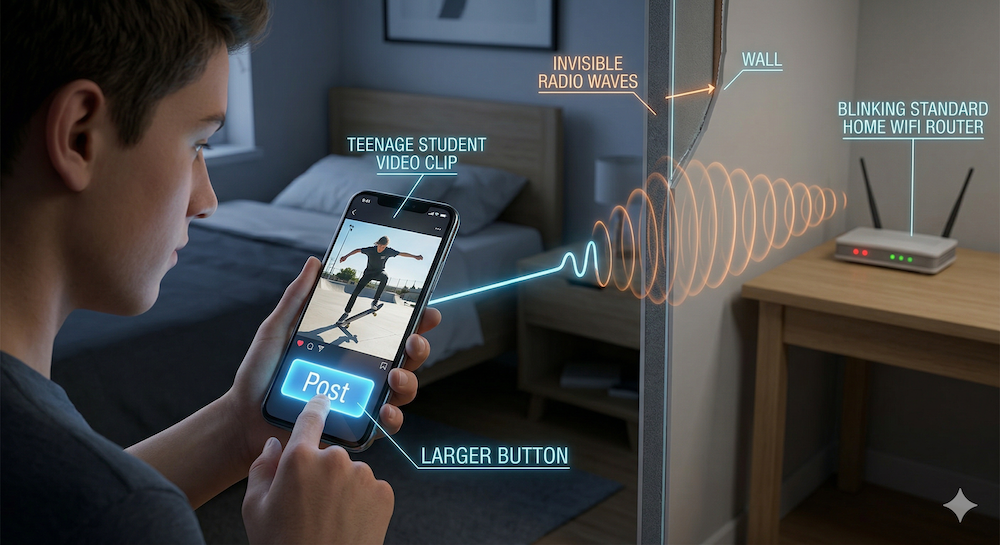
Imagine you hit "Post" on a video you just edited. It feels like your data vanishes into the air, but you've triggered a massive mechanical chain reaction. The internet isn't a cloud โ it's a physical global network of millions of computers connected by cables. Every tap of your screen launches data through a series of specialized machines.
When you hit Post, your phone converts data into invisible radio waves that travel to the nearest router or cell tower.
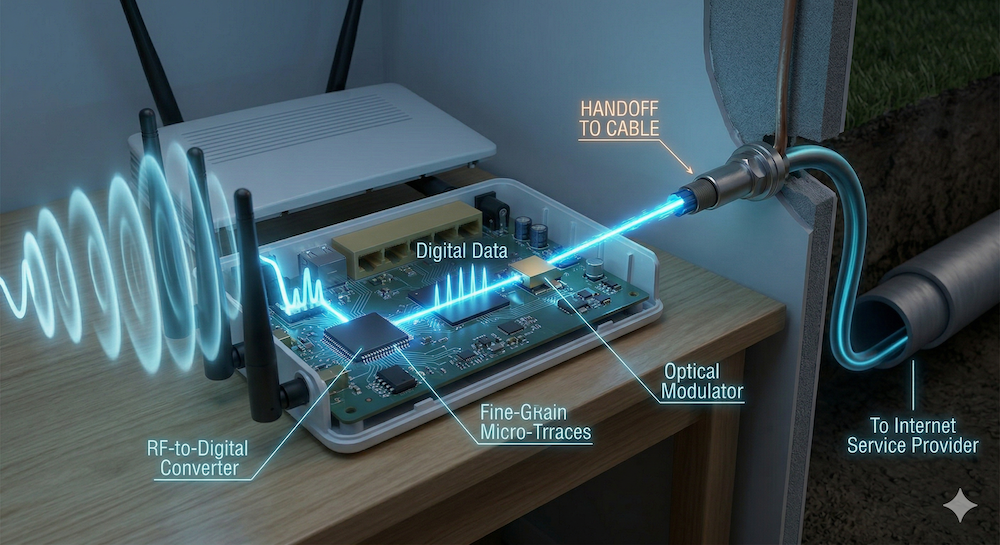
The journey starts with radio wavesInvisible waves of energy that carry data wirelessly through the air โ the same type of energy used by FM radio and TV broadcasts. Your phone has a wireless chip that converts data into radio signals. If you're on Wi-FiShort-range wireless connection using radio waves from a router in your home or building โ fast but only works nearby, those waves travel a few dozen feet to the router in your house. If you're on cellularLong-range wireless connection using radio signals sent to cell towers spread across your city โ works almost anywhere but is usually slower than Wi-Fi, your phone sends stronger signals to a cell tower miles away. Both do the same job โ they're the wireless last hop to reach a wire. Wi-Fi is short-range radio from a box you own. Cellular is long-range radio from towers your carrier owns. Either way, an antenna catches the signal and converts it into pulses of light that enter a physical cable running to your internet service providerA company like Comcast or AT&T that owns the cables and equipment connecting your home to the broader internet.
Inside the router: radio waves are caught, converted to digital data, then sent as light pulses through a cable to your internet service provider.
Wi-Fi and cellular both use radio waves. The only difference is range. Wi-Fi is short-range from your router. Cellular is long-range from towers. Both are just the wireless last hop to reach a physical cable.
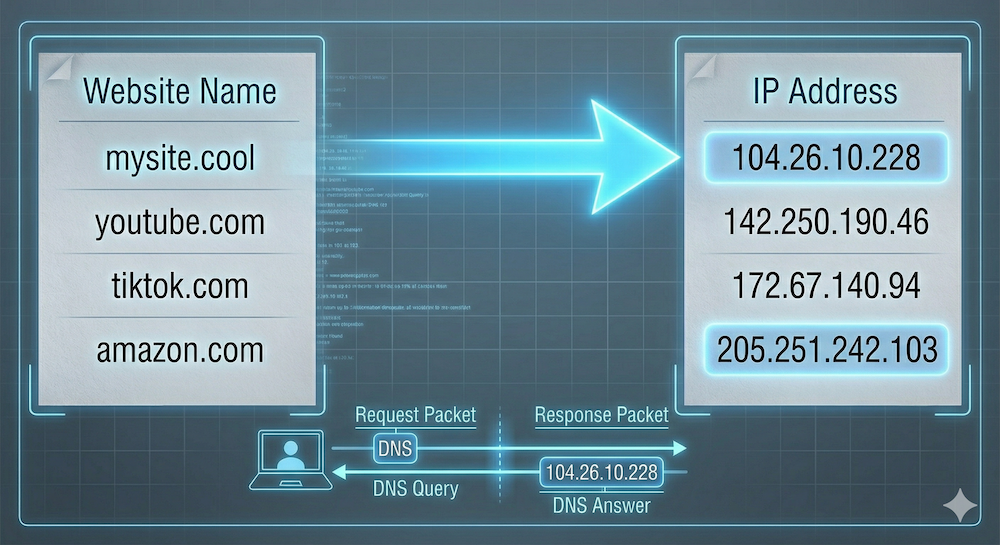
Before your data travels anywhere, your browserThe app that fetches and displays web pages on your device โ like Chrome, Safari, or Firefox โ the app doing the work on your end, like Chrome or Safari โ has to find the right destination. Computers don't recognize names like tiktok.com. They only recognize IP addressesA unique string of numbers (like 104.26.10.228) that identifies every computer on the internet โ like a street address for a machine, unique strings of numbers like 104.26.10.228. Your browser sends a quick question to a DNS serverDomain Name System server โ a computer that works like a phone book, matching website names (like tiktok.com) to their numerical IP addresses. DNS stands for Domain Name System โ a massive phone book matching website names to numerical addresses. Your internet provider runs one, Google runs a public one, Cloudflare runs another. The DNS server sends the right number back, and now your browser knows exactly which computer to contact.
DNS translates human-readable names like tiktok.com into numerical IP addresses that computers understand.
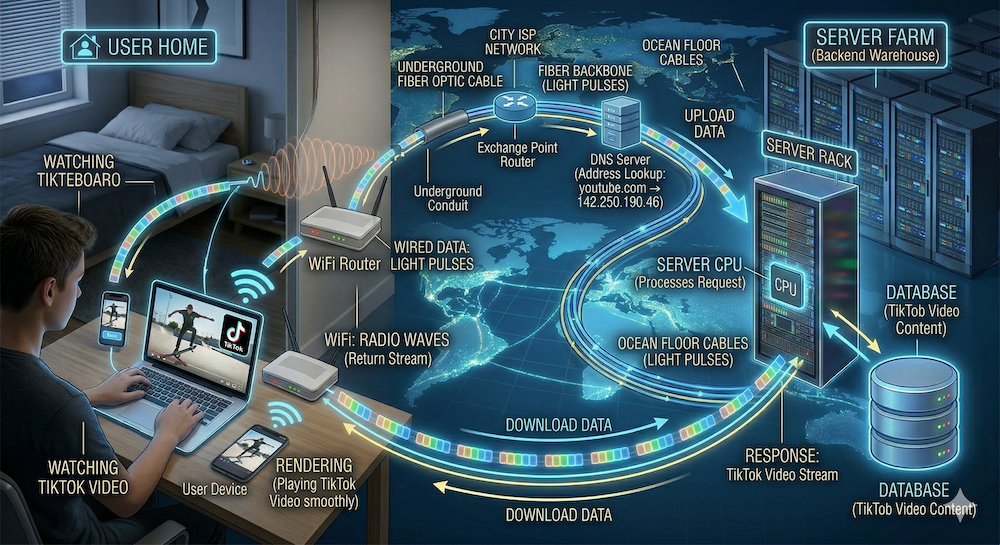
Now the real travel begins. Your data gets chopped into small chunks called packetsSmall pieces of data that travel independently across the internet, each stamped with a destination address โ like numbered pages of a letter sent in separate envelopes, each stamped with the destination address. These packets travel through fiber optic cablesCables made of thin glass strands that carry data as pulses of laser light โ they form the backbone of the internet and run under oceans connecting continents โ strands of glass thin as a human hair carrying data as pulses of laser light. These cables run under city streets and across the ocean floor connecting continents. At every intersection, machines called routersSpecialized computers at network intersections that read the destination address on each packet and forward it toward the fastest available path read each packet's address and steer it toward the fastest path.
The complete journey: radio waves leave your home, become light pulses in fiber optic cables, cross oceans, reach a server farm, and return the same way.
Your data doesn't travel in one piece. It's broken into packets that may take different routes across the globe, then get reassembled at the destination. The backbone connecting it all is glass cables carrying light.
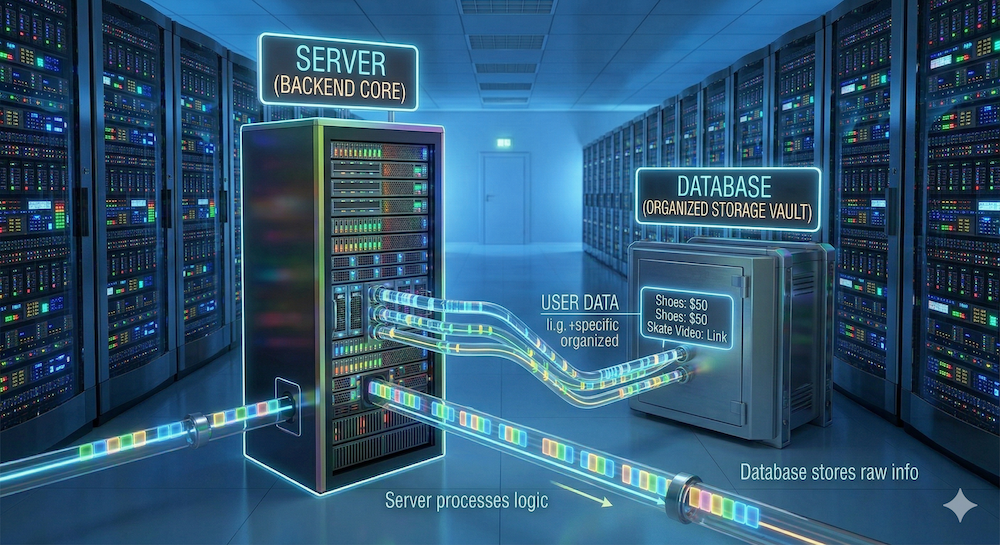
The packets land at a data centerA large building filled with thousands of servers โ owned by companies like Amazon, Google, or Microsoft โ that store and deliver website data around the clock โ a warehouse filled with thousands of serversPowerful computers designed to stay on 24/7 and respond to requests from other computers โ they "serve" web pages, videos, and data to anyone who asks, powerful computers that stay on around the clock to "serve" data. What happens next depends on the site. A simple static siteA website made of fixed files (HTML, CSS, images) that look the same for every visitor โ the server just hands over the files without any processing โ like a portfolio built with HTMLHyperText Markup Language โ the code that builds a web page's structure: headings, paragraphs, images, and links and CSSCascading Style Sheets โ the code that controls how a web page looks: colors, fonts, spacing, and layout โ the server just hands over the files. But if you're logging in or watching a personalized feed, the server runs backend codePrograms that run on the server (not on your device) to process requests, check logins, and pull personalized data โ written in languages like Python or JavaScript that talks to a databaseAn organized storage system on the server that holds information like usernames, passwords, prices, and video files โ the server queries it to find what each visitor needs, a separate system storing usernames, prices, or video files. If you're buying something, the server also coordinates with a payment processorA service like Stripe that securely handles credit card transactions โ it talks to the bank so the website never has to touch your card number like Stripe, which handles the bank transaction securely โ your card number never touches the website itself. That conversation is encrypted by HTTPSA security protocol that scrambles data between your browser and the server so nobody snooping on the network can read it โ the padlock icon in your address bar means HTTPS is active, which is what the padlock in your browser's address bar means. The server pulls what it needs and sends new packets back to you.
The server processes your request and pulls information from a database โ prices, videos, account details โ then sends it back as new packets.
It depends on what your site does. For a simple static page (your name, a photo, a joke), you just need a hosting company to store your files and a domain name so people can find you. Companies like GitHub Pages or Netlify host simple sites for free.
For interactive animations, you add JavaScript โ a programming language that runs inside the visitor's browser. The server doesn't work harder; the visitor's device does the thinking.
For user accounts and saved data, you need backend code running on the server plus a database. Now you're renting computing power from a cloud provider like Amazon Web Services or Google Cloud.
For payments, you add a payment processor like Stripe. It handles the bank, the security, and the regulations. You never store anyone's card number โ you just ask Stripe "did they pay?" and get a yes or no.
Your domain name comes from a registrar (like GoDaddy or Namecheap) โ a separate company from your host. The registrar lets you fill in the DNS phone book entry: "this name points to this server."
The final step happens on your device. Your browser catches the returning packets and follows the code's instructions. HTML builds the page structure. CSS sets colors, fonts, and layout. JavaScriptA programming language that runs in the visitor's browser and makes web pages interactive โ it powers animations, buttons, video players, and anything that responds to clicks runs the interactive parts โ animations, buttons, video players. This is called renderingThe process where your browser takes raw code (HTML, CSS, JavaScript) and turns it into the visual, interactive page you see on screen, and your device does it locally.
The server sends the blueprint. Your browser builds what you see. HTML is the structure, CSS is the style, JavaScript is the interactivity. All three travel as packets and come alive on your screen.
Every time you tap a link, this relay happens in milliseconds. Radio waves carry data to the router. Light pulses through glass under the ocean. A server pulls your data. Your browser assembles everything on screen. It's not magic โ it's addresses, cables, radio, and a lot of computers passing notes really, really fast.
The internet is a physical relay: wireless radio to your router, light through fiber optic cables across the world, servers processing your request, and your browser rendering the result. Every tap triggers this entire chain in milliseconds.